
Photo cropping tool
Get composition suggestions. Fine-tune your crop and export at native resolution.
Batch mode: up to 5 photos · analyzed on your device
Two ways to crop one photo
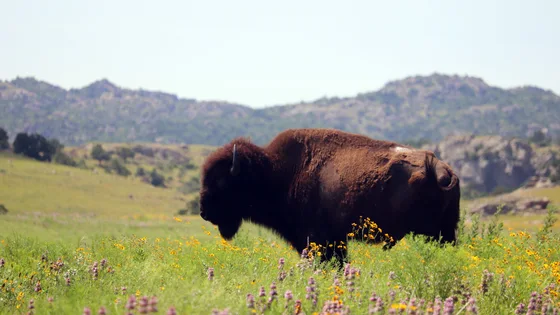
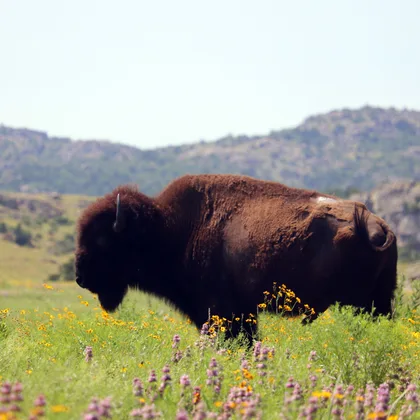
More of the setting, or a closer view of the subject. Choose the framing you prefer.
Source photo: public domain · both crops exported by CropBetter.
Photo: Quinton Smith/USFWS
Choose the frame for your next task
Each tool starts with the frame ready for its purpose.
Crop an image into a square
Start at 1:1 for a profile picture, a product photo or a square post.
Open toolCrop an image to 16:9
Start with a wide frame for a video cover, a screen or a landscape photo.
Open toolFacebook cover cropper
Start at 851:315 and check how your cover may appear on desktop and mobile.
Open tool
How to crop a photo
Choose a photo, drop it into the tool, or paste it from your clipboard. Compare the composition suggestions, then adjust the frame to suit your photo. Your original file stays untouched. If you have several photos, optional batch mode accepts up to 5 in a group and opens one at a time.
When two suggestions are available, compare their reasons and click a photo to keep it. In a group, that continues to the next photo. Choose Edit A or Edit B for independent adjustments, or Neither — adjust manually if neither suits you. Drag to reposition the frame, resize it, or choose a ratio. You can revisit a photo from the thumbnail strip and export any frames already kept without finishing the group. Multiple results download as a ZIP.
Composition hints that leave the choice to you
Cropping changes what a viewer notices first. Removing an empty strip above a person can make their expression easier to see. Leaving space around a small figure can explain the size of a landscape. Neither intention is automatically better. The useful comparison is whether the new frame says what you wanted the photo to say. If the wider view matters, keep it.
The rule of thirds overlay is a starting point, not a score you need to satisfy. You can also turn on individual golden-ratio, center, or level guides. A centered doorway may work best with its symmetry intact, while a moving subject may need room in front of it. Suggestions use local image patterns and can miss the meaning of a face, an edge, or a quiet sky. Review important details before exporting, especially if a tighter frame cuts close to them.
Frequently asked questions
Is CropBetter free?
Yes. Photo cropping, composition suggestions, manual adjustments and native-resolution JPEG or PNG export are free. Optional batch mode accepts up to 5 photos per group; keeping both frames does not use another photo slot. No account or subscription is required.
Can I use it on iPhone?
Yes. Open CropBetter in Safari, choose a photo from your library and use the on-screen controls to adjust and export it. Large files can exceed a phone's memory even below the 30 MB limit; try one photo or a smaller crop if an operation fails.
Does CropBetter support HEIC?
HEIC and HEIF are accepted only when your browser can decode the selected file natively. CropBetter does not include a HEIC converter. If the file cannot be opened, use a JPEG or PNG copy instead.
What Facebook cover photo size does the tool use?
The Facebook cover cropper starts at the 851 × 315 reference ratio. This selects the crop shape; exports retain the native pixels in the selected area and are not forced to 851 × 315. Check important details in Facebook's desktop and mobile publishing previews.
Do my photos leave my device?
No uploads, no AI-generated images — your photo never leaves your device. Photo selection, analysis, editing and export run locally. Loading the website still makes ordinary requests for its pages and static assets; the privacy policy explains that distinction.
Does cropping reduce the resolution?
A smaller crop contains fewer pixels because it removes part of the original. Unrotated crops retain native pixel dimensions without enlargement. Fine rotation resamples existing pixels and crops empty corners; the export panel shows the angle, output dimensions and percentage of the original area cropped. JPEG is encoded once at quality 92%; PNG uses lossless encoding.
Can I use the photo cropping tool offline?
After the tool has loaded, manual photo editing and export work without a network connection. AI composition analysis needs its analysis resources first; if those are unavailable, use Adjust manually. Keep the tab open: this version does not install an offline cache, so a fresh visit or reload may need a connection. Reloading also clears the photos and drafts held in memory.
What can I upload?
JPEG, PNG and WebP are supported, up to 30 MB per file and 5 photos per group. HEIC works only when your browser can decode it natively. If a format cannot be opened, choose a JPEG or PNG copy instead; CropBetter does not send it away for conversion.
Framing a cover?
Check the Facebook cover photo size reference and start with an 851 × 315 crop ratio. Export dimensions follow your chosen crop.